Active deals · AEs, CSMs, and founder-led sales

Multithread any deal in one Cowork session.

Scenario: after a call, your buyer mentions that the CISO and CEO will both weigh in. That is useful context, but only if you act on it quickly.

Using Claude + Via, you can pull those stakeholders from the transcript, find warm paths through your team and customer champions, and generate the exact Slack and email drafts needed to activate those paths.

In seconds, you learn your VP Sales worked with the CISO at Stripe, and one of your customers was a YC batchmate of the CEO.

Instead of sending a generic follow-up and hoping your champion forwards it, you now have two warm plays to expand the deal.

Example stack Via Granola Slack Gmail

How to run it

Four steps. One Claude conversation.

Install the connectors, open Cowork, paste the prompt, review the drafts. A runbook — not an article.

Install the MCPs in Claude.

In Claude, open Settings → Connectors → Browse connectors and add the four you'll need for this workflow. Via is currently in private beta, so you'll need to request access before it shows up in your directory. (Claude's menu labels can shift — if the path has moved, look for the connectors browser under your account or workspace settings.)

  • Via — for the warm-path tool calls. Request access →
  • Your call recorder — Granola, Fireflies, Otter, or Zoom. Whichever your team already uses.
  • Slack — for drafting messages to teammates in your Team Circle.
  • Your email client — Gmail or Outlook, for drafting vouch-note requests to your Customer Champions Circle.
Open Claude Cowork.

Multi-tool workflows like this run more reliably in Claude Cowork than in regular chat. The agentic workspace handles four sequential tool calls without losing context, and gives you an audit trail of what each connector did.

Paste this prompt in Cowork.

Replace Acme with the prospect company. The prompt tells Claude to prioritize Team Circle paths first, fall back to Customer Champion paths, and draft only — nothing gets sent automatically. Uncertain matches go into a "Needs Review" section at the bottom for your eyes.

Heads up: this prompt assumes you've set up a Team Circle and a Customer Champions Circle in Via. You can do that directly from Claude — just ask Via MCP something like: "Create a Customer Champions Circle with the following LinkedIn URLs: [paste URLs]." Same pattern for the Team Circle.

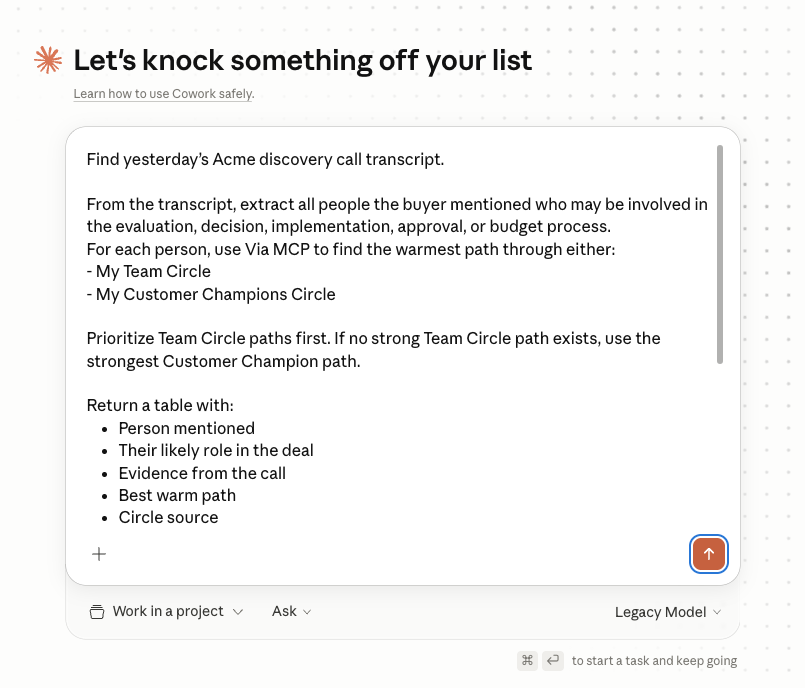
The multithread prompt pasted into Claude Cowork's composer
The prompt as it looks pasted into Cowork's composer.
Find yesterday's Acme discovery call transcript. From the transcript, extract all people the buyer mentioned who may be involved in the evaluation, decision, implementation, approval, or budget process. For each person, use Via MCP to find the warmest path through either: - My Team Circle - My Customer Champions Circle Prioritize Team Circle paths first. If no strong Team Circle path exists, use the strongest Customer Champion path. Return a table with: - Person mentioned - Their likely role in the deal - Evidence from the call - Best warm path - Circle source - Recommended next action Then draft the appropriate outreach: For Team Circle paths: Draft a Slack message to the teammate asking them to ping the Acme contact directly. For Customer Champion paths: Draft an email to the connector asking whether they'd be open to sending a short note to the Acme contact. Do not send any messages or emails. Draft only. Put uncertain matches or weak paths in a "Needs Review" section.
Review every draft before you send.

Claude returns every stakeholder the buyer named, the warm path to each, and a draft for each — a Slack to a teammate for Team Circle paths, a short vouch-note request email to your champion for Customer Champion paths. Always keep a human in the loop on personalized outreach. The prompt is set up to draft only — nothing leaves your inbox or Slack until you press send. Two things to do for every draft:

  • Check for accuracy. Verify the trust signal Via cited (the past job overlap, the YC batch, the investor relationship), the role you're attributing to the stakeholder, the spelling of names. Drafts are starting points, not finished sends — an inaccurate detail in a vouch-note request reads worse than no request at all.
  • Add the line only you could write. Claude has the transcript, but it doesn't have the side conversations, the body language, the gut read on what your champion will and won't endorse, or your voice. Drop in a detail Claude couldn't have known — something your champion mentioned off the record, a callback to a past exchange that lives only in your DMs, or a phrase the recipient will recognize as you. That's what turns the draft into a message that actually lands.
Other Via MCP workflows

Pair this with the rest of your motion.

Get started

Stop letting deals stall on a single thread.

Get the warm intros queued before your buyer's other priorities knock you out of cycle.

Request access Back to Via MCP